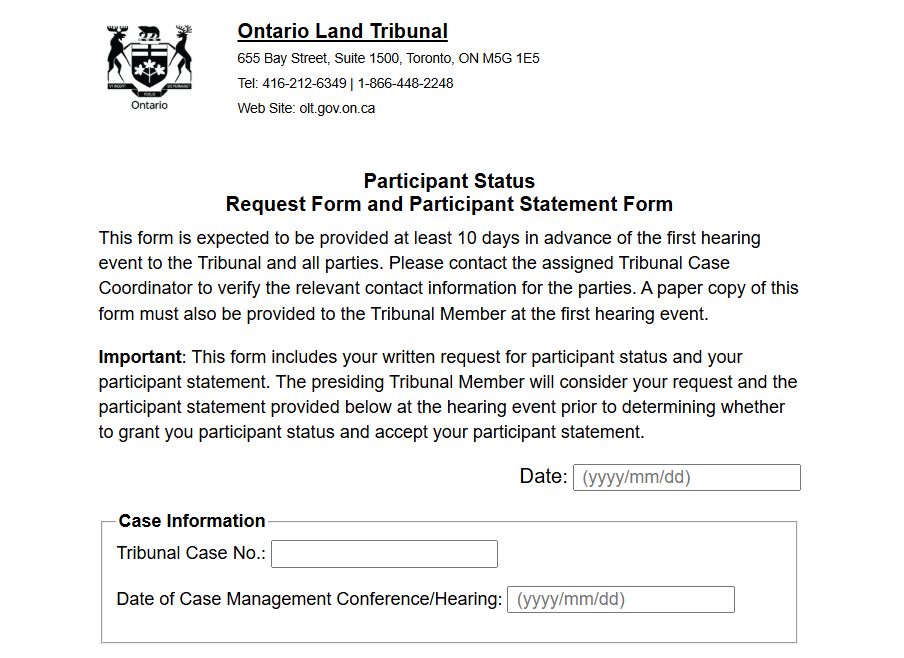
Follow the instructions below to send comments to the Ontario Land Tribunal (OLT)
Fill out the Participant Request Form using instructions below
Fill in OLT Case file number
Date of Hearing or Case Management Conference (CMC)
Fill in your name and email
Representative: leave blank
Type your statement in the box on the form
Save your completed Participant Request Form by using the ‘save’ button on the form page. It will save to your ‘downloads’ folder
Write an email to the Case Manager listed asking to be granted Participant Status for the case and include the OLT case number in the subject line
Attach your completed Participant Request Form to your email
Send your email and the attached Participant Request Form to all the listed contacts at least 10 days before the event
Watch your email inbox for notices of dates with links to virtual meetings
Log in to the CMC or Merit Hearing on the date to observe.
Requesting “Participant Status” at the OLT allows you to:
send the Tribunal a written submission with your concerns
observe the virtual hearings (similar to a zoom meeting)
be added to the Tribunal’s mailing list for updates and decisions
Participants cannot speak at OLT events, only observe. Using the chat function or interrupting will result in removal from the virtual meeting.